Free software from Citrus Media

Glint

Broadcast-quality sparkle, built for motion designers.

Free to download for macOS, Windows (beta) and Linux.

Glint is a standalone GPU particle generator. It creates glowing, twinkling, premium-looking particle effects for TV idents, titles and motion graphics. It renders them as image sequences with alpha, so you can layer them into After Effects, EffectCraft, DaVinci Resolve, Premiere or any other compositor.

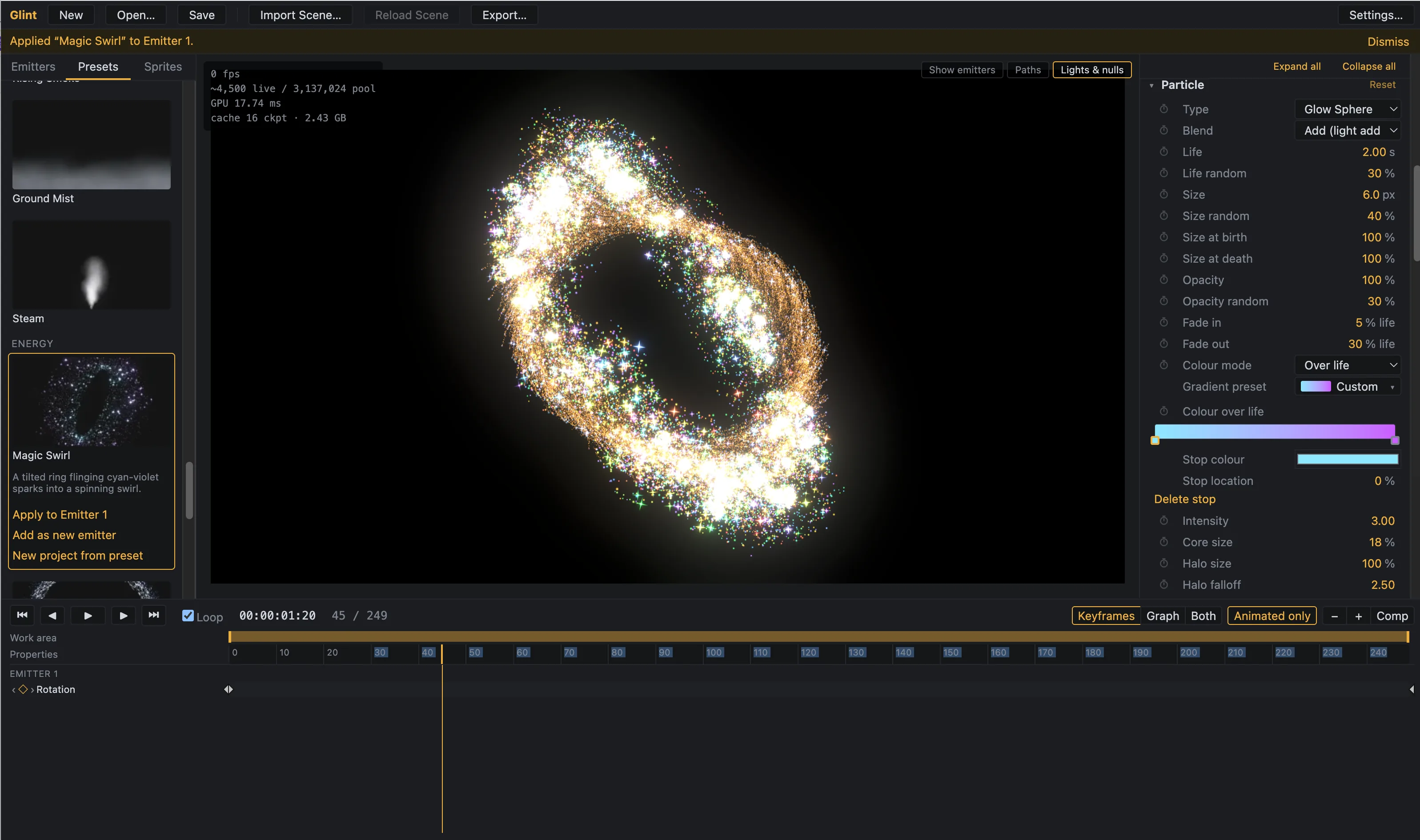
Glint rendering a glowing gold particle swirl, shown inside the app alongside its particle, preset and timeline panels

Why Glint

A lot of motion graphics work needs the same few effects, done well: a trail of sparks following a light, a burst of gold, a field of drifting stars. Glint focuses on these. It aims at the sparkle look in particular, with glowing cores, soft halos, star glints and bloom that holds up on a broadcast monitor and doesn't look like a game effect.

It runs as its own app, so there's no host plugin to install and nothing to crash your compositor. You design the effect, render it, and drop it into your comp.

What you can make

  • Continuous emitters

    A steady stream of particles with control over rate, life, and when emission starts and stops. Emitters can follow an animated light imported from your After Effects comp. Fast-moving emitters leave smooth trails, because Glint emits across the frame rather than once per frame.

  • Bursts and explosions

    Release particles all at once, then shape them with gravity, drag, wind and turbulence. Turbulence can fade in over each particle's life, which gives explosions their classic billowing spread.

  • Deep fields

    A 3D box of slowly undulating particles that the camera can fly through endlessly. Depth fade and depth of field give it real scale.

  • Emitter shapes

    Point, box, sphere, ring, disc, line and light emitters. Box, sphere, ring and disc sizes can be keyframed. Either end of a line emitter can attach to a light in your scene or to a Glint Probe null, so you can draw sparks along a moving path.

  • Sub-emitters

    Particles can spawn further particles at birth or death, or leave trails of their own, to two levels. This is how the fireworks presets get their peonies, willows and crossettes.

  • Smoke, mist and steam

    A cloud particle type for soft, billowing effects.

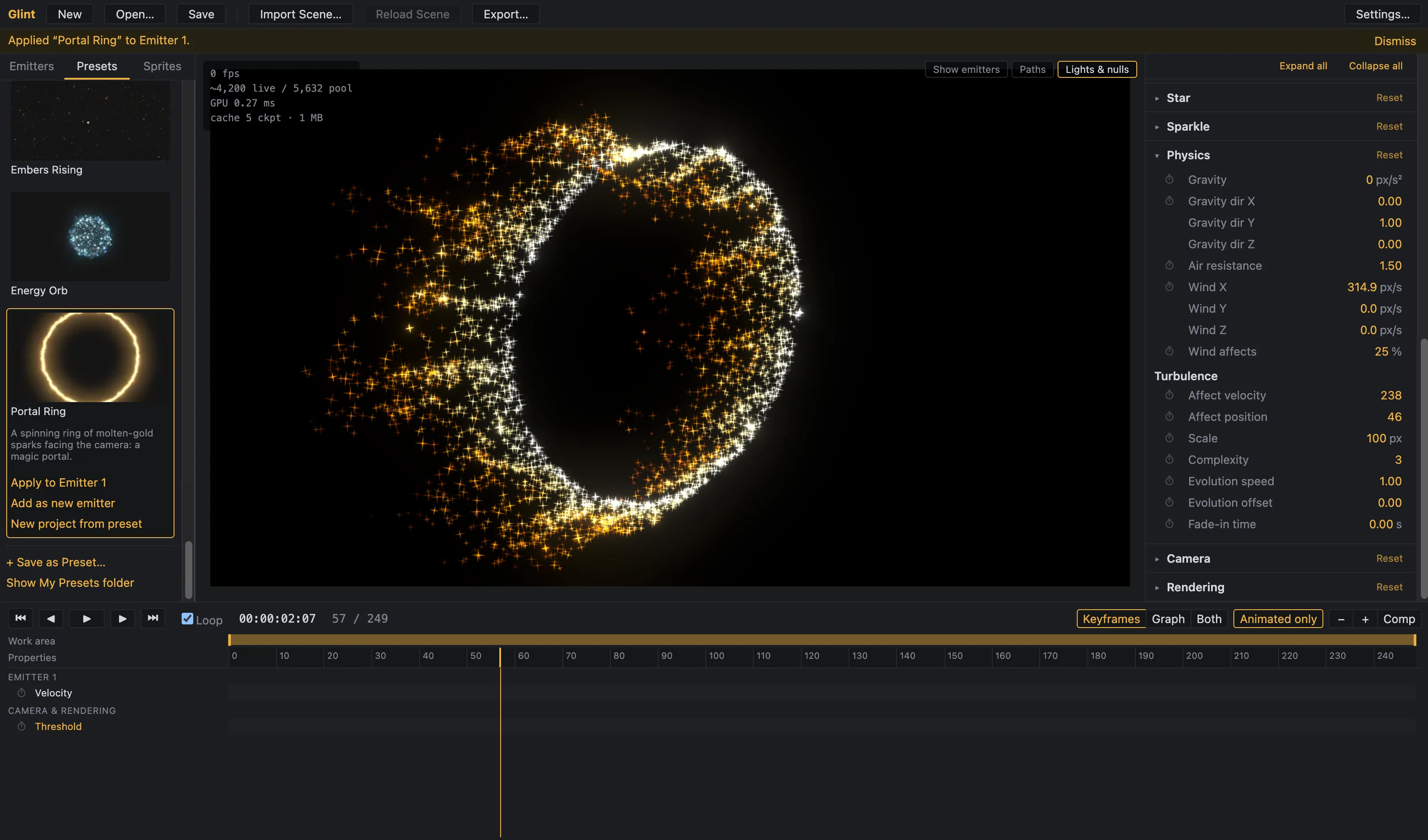
A glowing ring of white and gold star-shaped sparkle particles rendered in Glint, with the app's physics and turbulence controls visible

The sparkle look

  • Particle types: glow spheres, multi-spike stars, velocity-aligned streaks, clouds, and your own sprites.

  • Twinkle: every particle twinkles on its own phase, so they never pulse in sync. Sharpness controls whether you get a soft shimmer or brief, bright glints.

  • Glint flashes: occasional star-flares on random particles, for the classic ident sparkle.

  • HDR colour: colours can go beyond white, so bright cores drive the bloom naturally. Colour can be single, random from a gradient, or change over each particle's life.

  • Bloom: threshold, knee, intensity, radius and tint controls, on a high-quality HDR chain.

  • Motion blur and depth of field: shutter angle and phase set to After Effects conventions, with depth of field that makes particles larger, softer and dimmer as they leave focus.

  • Blend modes: additive by default, or Normal blending with GPU depth sorting when you need particles to occlude each other.

Presets and custom sprites

Glint ships with 33 built-in presets that look good on first play. They include sparkle trails, gold bursts, silver dust, deep space drift, magic swirls, fireworks (Peony, Willow, Rocket + Explosion, Crossette, Finale), and smoke, mist and steam. Save your own presets as single files with their sprites embedded, so they're easy to share.

Load your own sprites from images, sprite sheets or image-sequence folders. There are 10 built-in sprites to start with. Each emitter can mix up to four weighted sprites, with tint or original colour, align-to-motion, and Screen blend.

Works with After Effects and EffectCraft

Glint reads your camera and lights from Adobe After Effects or EffectCraft, so rendered particles line up exactly when you layer them back into your comp.

  • After Effects: a small export script runs inside After Effects and writes out your camera, lights and comp settings. A matching import script brings the rendered sequence back, set to the right blend mode with alpha interpreted correctly.

  • EffectCraft: Glint works with EffectCraft scenes through the EffectCraft command-line tool.

EffectCraft is a separate, independent open-source project. It is third-party software and is not made by or affiliated with Glint or its developer. Adobe and After Effects are trademarks of Adobe Inc.

You can also load a background plate for in-context preview. The plate is for preview only and never appears in the output.

Predictable, repeatable renders

Frame 120 always looks the same, whether you reach it by playing, scrubbing or exporting. Every random value comes from a fixed seed, so there are no surprises between preview and final render, and no flicker between renders. Scrub freely, change your mind and come back to a frame without it changing.

Output

FormatDetails
PNG16-bit RGBA, premultiplied or straight
OpenEXRHalf-float RGBA, keeps HDR values above 1.0
ProRes 4444With alpha, via bundled ffmpeg

You can export separate passes: beauty with bloom, beauty without bloom, and bloom only. That lets you adjust the glow in your compositor. Export has frame range, resolution scale, motion blur sample count, and a progress bar with ETA and cancel.

Workflow

  • Timeline with play, loop, work area, frame-accurate stepping and keyframes on emitter, particle, physics and rendering parameters
  • Keyframe graph view, plus gradient and curve editors for over-life properties
  • Scrubbable sliders, undo/redo, autosave and crash recovery
  • Broadcast safe-area guides, transparency checkerboard and a live stats overlay
  • Self-contained project files (.glint) with a Collect Files option for gathering your sprites

System requirements

macOS

  • macOS 13 (Ventura) or later
  • Apple Silicon Mac recommended
  • 8 GB RAM minimum, 16 GB or more recommended
  • About 500 MB of free disk space, plus room for your renders

Windows (beta)

  • Windows 10 or later, 64-bit
  • A graphics card with Direct3D 12 support and up-to-date drivers
  • 8 GB RAM minimum, 16 GB or more recommended
  • About 500 MB of free disk space, plus room for your renders

Both platforms

  • A GPU that supports WebGPU. Any recent Mac and most graphics cards from the last several years qualify.

Optional integrations

  • After Effects: a recent version. In Preferences > Scripting & Expressions, turn on "Allow Scripts to Write Files and Access Network" so the export script can save your scene data.
  • EffectCraft: requires the EffectCraft command-line tool, which is a separate download from the EffectCraft releases page.

Windows beta

The Windows version is a beta release. It has been built and packaged, but it has had far less testing than the Mac version. If you find a problem, please let us know.

Download

macOS

Apple Silicon Mac recommended.

Apple Silicon

Version 1.0.1 · 145.2 MB · Release date to be confirmed

Intel

Version 1.0.1 · 158.8 MB · Release date to be confirmed

Windows (Beta)

Windows 10 or later, 64-bit.

Download for Windows (Beta)

Version 1.0.1 · 146.2 MB · Release date to be confirmed

Linux

AppImage, runs on most distributions.

x86_64

Version 1.0.1 · 147.1 MB · Release date to be confirmed

ARM64

Version 1.0.1 · 144.1 MB · Release date to be confirmed

Doug, founder of Citrus Media

Need something built for broadcast or motion graphics?

If you need a custom tool, pipeline or motion graphics project built around your workflow, talk to Doug.

Talk to Doug

We use Google Analytics to see how people use this site, so we can improve it. Turning analytics off stops it completely.